Screenza vs Paper Menus
A straight comparison of digital menu boards and paper menus for restaurants — including where paper still wins. No hype, just what changes when your menu moves onto a screen.
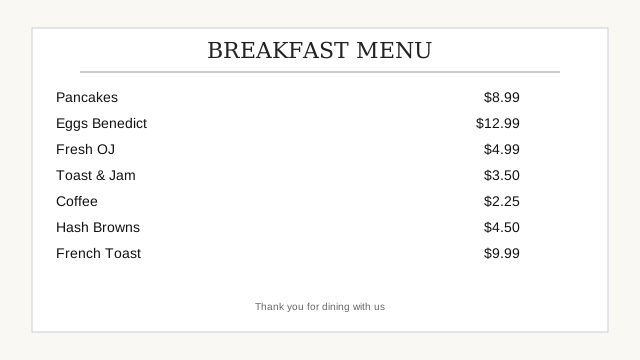
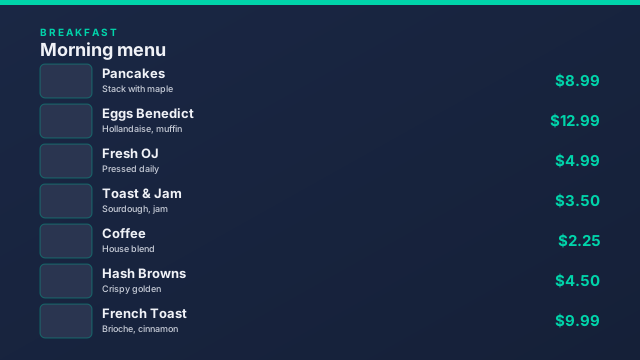
The same breakfast menu, two ways
On the left, a printed menu. On the right, the same items as a designed screen board.
How they compare, point by point
| Point | Paper menus & printed boards | Screenza digital menu board |
|---|---|---|
| Change a price | Reprint, redesign, or edit by hand | Edit the item and publish in seconds |
| Sold-out dish | Cross it out or tape over it | Hide the item from the screen |
| Food visuals | Print-quality photos cost extra per print run | AI-generated food photography and promo banners |
| Time-of-day menus | Swap boards or signs by hand | Dayparts switch breakfast, lunch, and dinner automatically |
| Weekly specials | A new sign every week | Scheduled once, starts and ends on time |
| Multiple locations | Redesign and reprint per site | Publish the same board everywhere at once |
| Looking worn out | Fading, smudges, curling corners | Always looks freshly designed |
| Upfront effort | None if the menu is already printed | Import the menu and publish — about 15 minutes |
| Power & internet | Neither required | Requires power; a connection for updates, with offline playback |
Where paper menus still make sense
- Handheld menus. Customers need a takeaway menu they can hold; a screen does not replace that job.
- No power where the menu hangs. A wall without an outlet is a wall that keeps its printed board.
- A menu that never changes. If prices and dishes are fixed for a long time, printing is simple and cheap.
- As a backup. Keeping one printed copy behind the counter is sensible insurance while you get comfortable with screens.
If most of that list sounds like your restaurant, paper is a fine choice. Screenza is built for the restaurants where the menu does change — prices move, dishes sell out, and specials rotate.
What changes when the menu moves to a screen
Prices stay correct
The most expensive thing about a printed menu is how quickly it becomes wrong. When you change a price in Screenza, every screen shows the new number on the next publish. Nothing gets reprinted and no old board lingers with last month’s price.
Food sells itself
A printed menu lists dishes. A screen shows them. AI generation creates digital menu boards and promo banners with food photography, so a featured dish gets a full-size visual and a price instead of one line on a list. Browse menu board examples to see the difference.
Specials run themselves
Weekly specials, lunch-only offers, and holiday campaigns can be scheduled as digital weekly specials that appear and retire on their own. On paper, someone has to remember to put the sign out and take it down.
Every location looks the same
With paper, each site prints its own version and the brand drifts. With Screenza, every location publishes from the same layouts, so a customer sees the same restaurant in every branch — with per-location prices where they differ.
Is a screen cheaper than paper?
It depends on how often your menu changes — and it is worth doing your own arithmetic before switching. Paper costs a small amount per reprint, plus the time to design and print it each time something changes. A screen costs a subscription per screen per month, plus a one-time device if you do not already have one, and changes cost nothing extra.
If you reprint menus or remake signs a few times a year, paper is usually cheaper. If prices, sold-out items, and weekly specials change constantly, the screen subscription buys back the reprint cost and the design time. Screenza’s plans start with a free plan for one screen, then $16 to $42 per screen per month with annual billing about 14% lower — the current numbers are on the pricing section. The full definition of the technology is in what is a digital menu board.
How to switch without disrupting service
Keep the paper during the transition. Leave the printed board up until the screen has run successfully for a few days.
Import your menu. Photograph the printed menu or upload the PDF; Screenza turns it into editable menu data.
Retire the print. Once staff and customers are used to the screen, take the printed board down and keep one copy in the office.
Step-by-step setup, including pairing a screen for the first time, is covered in the Getting Started guide.
Common questions about switching
Do I have to choose between screens and paper?
No. Many restaurants keep printed takeaway menus and use screens for the boards behind the counter. The screen replaces the board, not the paper menu a customer takes home.
What if the screen breaks or the power goes out?
A printed backup menu kept behind the counter covers a power cut. For hardware failures, any TV with a browser can take over — open the same screen URL on a spare device and the menu is back.
Is a screen harder for staff to update than paper?
No. Hiding a sold-out dish or changing a price takes a few taps in the dashboard, and multiple team members can access the same account. There is nothing to print or re-tape.
Can I try it before replacing my printed menus?
Yes. The Free plan runs one screen with no credit card required, so you can put a board on a TV next to your existing signage and compare for yourself.